UX research methods, such as surveys, usability testing, card sorting, and diary studies, each answer different questions and carry their own tradeoffs between cost, depth, and bias. Using multiple methods together gives teams comprehensive insights, lets them cross-verify findings, and overcomes the limitations that come with relying on any single technique alone.

Bad UX is expensive. IBM research found that fixing a design problem after development is complete costs between 10 to 100 times more than fixing it during the design phase. Meanwhile, companies in the top quartile of McKinsey's Design Index showed 32% higher revenue growth and 56% higher total returns to shareholders over a five-year period compared to industry counterparts.
The difference? They understood their users before they built, not after.
UX research methods are how you get that understanding. They help you see how real people interact with your designs, where they get stuck, what they actually need, and why they behave the way they do. Using multiple methods together gives you a more complete picture — quantitative data tells you what's happening, qualitative methods explain why.
Combining methods also helps you:
get comprehensive insights across different aspects of the experience
validate findings by cross-referencing data from different sources
approach research questions from multiple angles
offset the limitations of any single method
20 Most Useful UX Research Methods
1. Surveys
Surveys use structured forms with question types like multiple choice, rating scales, and ranking questions. They can collect both quantitative and qualitative data — though the qualitative responses you get from surveys tend to be less actionable than what you'd get from direct conversation.
When it works Cost-effective and fast when you need input from a large number of users Watch out for, meanwhile, Stated responses can carry bias; qualitative data may lack depth
Further reading: The Ultimate Guide to Survey Question Types
2. Usability testing
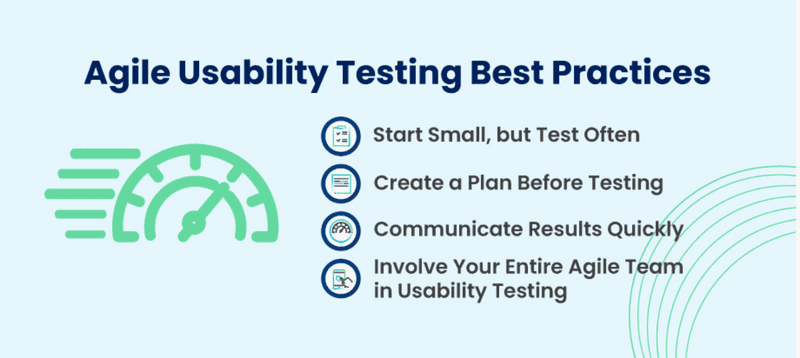
Usability testing puts a prototype or live product in front of real users and asks them to complete specific tasks. Researchers observe and note where users run into problems, hesitate, or take unexpected paths. You can run usability tests as moderated or unmoderated, remote or in-person depending on your goals and resources.
When it works Identifying friction in user flows; improving conversion and task completion rates Watch out for, meanwhile, Sample size is typically small; a lab or testing environment may not fully reflect real-world use
Further reading: A Comprehensive Guide to Conduct Usability Testing · Run moderated usability sessions with Decode's AI Moderator
3. Concept testing
Concept testing measures whether an idea or design has appeal before you invest in building it. Sharing early concepts with users lets you validate that there's real demand — and catch fundamental problems before they become expensive ones.
When it works Early-stage validation; reducing the risk of launching something users don't want Watch out for, meanwhile, Feedback depth can be limited; responses may be influenced by social desirability bias
Further reading: A Guide to Concept Testing for UX
4. 5-second test
Users view a design or web page for exactly five seconds, then answer questions about what they saw. It's a fast way to test first impressions — whether key elements like CTAs, headlines, or navigation are noticeable in the time it actually takes a user to scan a page.
When it works Quick, easy to run, and good for testing visual hierarchy and clarity Watch out for, meanwhile, Gives limited context about the broader user experience; results can be subjective
5. Card sorting
In card sorting, users organize topic cards into groups and label them in a way that makes sense to them. It's used to understand how users think about information architecture — helping you design navigation and content structures that match real mental models rather than internal assumptions.
When it works Planning or restructuring information architecture; easy to set up and cost-effective Watch out for, meanwhile, Results reflect how users group information, but not how they search for or use it
6. Tree testing
Tree testing evaluates the navigation structure of a website or app without the visual design in the way. Users work through a simplified text-only version of the site's structure to find specific content, revealing whether your navigation hierarchy is clear or confusing.
When it works Testing whether users can find what they're looking for; validating IA before visual design begins Watch out for, meanwhile, Only tests findability — doesn't reflect the full browsing or discovery experience
7. A/B testing
A/B testing (or split testing) shows different groups of users two versions of a product, page, or element to see which performs better. You can test designs, copy, user flows, button placement, or almost anything measurable — and it works well as a complement to other research methods that explain the why behind the numbers.
When it works Data-driven decision-making; improving conversion rates with measured changes Watch out for, meanwhile, Tells you which version won, not why; limited to testing one variable well at a time
8. User interviews
User interviews are one-on-one conversations with users to understand their goals, behaviors, and experiences with a product. They work best when you start broad — establishing context about the user's world — before narrowing to specific product questions. Interviews can also incorporate other methods like card sorting or task analysis within the session.
When it works Rich qualitative insight; flexible enough to follow unexpected threads Watch out for, meanwhile, Time-intensive; responses can be influenced by how questions are phrased
Further reading: How to Conduct an Effective User Interview
9. Focus groups
Focus groups bring together a small group of participants — typically 5 to 10 people — to discuss a product, concept, or experience with a moderator guiding the conversation. They can be run in person or via video conferencing. The group dynamic can surface ideas and reactions that one-on-one interviews might not.
When it works Getting in-depth group perspectives efficiently; exploring attitudes and reactions to concepts Watch out for, meanwhile, Small sample; dominant participants can skew group responses
10. Task analysis
Task analysis breaks down the steps a user takes to complete a goal — mapping out the full sequence of actions, decisions, and mental effort involved. It helps identify where in a user flow the experience becomes unclear, inefficient, or error-prone.
When it works Reducing errors and cognitive load; improving the efficiency of complex workflows Watch out for, meanwhile, Time-consuming to conduct thoroughly; focused on specific tasks, not the wider experience
Further reading: How to Conduct Task Analysis for Exceptional UX
11. Eye tracking
Eye tracking uses cameras and specialized algorithms to record where users look as they interact with a design, ad, or interface. It shows which elements capture attention, which get ignored, and whether users are looking where they're supposed to — capturing behavior that users themselves often can't report accurately.
When it works Understanding visual attention; identifying what's being overlooked in layouts and packaging Watch out for, meanwhile, Requires accurate calibration; data quality can vary
Further reading: Eye Tracking in Usability Testing
12. Mouse tracking / click tracking
Mouse tracking records how users move and click as they navigate a website, app, or prototype. Heatmaps generated from this data show which areas get the most attention and which are being ignored — useful for identifying navigation problems and optimizing page layouts at scale.
When it works Large-scale behavioral data; optimizing conversion funnels and page layouts Watch out for, meanwhile, Shows what happened, not why; mouse position doesn't always reflect where someone is actually looking
13. First-click testing
First-click testing presents users with a task and records where they click first. Research suggests that users who click correctly on their first try are far more likely to complete a task successfully. It's a focused way to test navigation architecture and task efficiency early in the design process.
When it works Early usability insights; understanding users' mental models around navigation Watch out for, meanwhile, Narrow in scope; needs to be paired with other methods for a fuller picture
14. Contextual interviews
Contextual interviews combine conversation with direct observation of users in their natural environment — at their desk, in a store, at home. Because users are in their real context rather than a testing lab, the insights tend to be more authentic and often surface behaviors users wouldn't think to mention in a standard interview.
When it works Uncovering unconscious or habitual behaviors; researching products used in specific environments Watch out for, meanwhile, Time and resource intensive; the presence of a researcher can subtly change user behavior
15. Heuristic evaluation / expert review
In a heuristic evaluation, UX experts review an interface against established usability principles (like Nielsen's 10 heuristics) and identify issues ranked from minor to critical. It doesn't involve real users, but it can surface a large number of usability problems quickly and cheaply.
When it works Cost-effective and fast; useful when you need an expert audit before user testing Watch out for, meanwhile, Reflects expert opinion, not user behavior; finding the right experts matters
Further reading: How to Conduct an Effective Heuristic Evaluation
16. Parallel design
Parallel design involves multiple designers independently creating solutions to the same design problem, then reviewing and combining the best ideas from each. Getting diverse perspectives on the same problem reduces the risk of fixating on one approach too early.
When it works Early ideation; reducing individual bias in the design process Watch out for, meanwhile, Resource-intensive; evaluating and merging multiple concepts takes time
17. Personas
Personas are fictional representations of key user types, built from real research data. They capture the goals, needs, motivations, and behaviors of distinct user groups — giving design and product teams a concrete reference point for decision-making rather than designing for an abstract "average user."
When it works Keeping teams aligned around real user needs; guiding decisions across design and product Watch out for, meanwhile, Personas can become outdated; risk of oversimplifying user groups if not grounded in solid research
18. Field studies
Field studies are conducted in the user's actual environment — their office, home, or wherever they use the product. Observing users in context, with all the real-world noise and interruptions that come with it, tends to surface behaviors and workarounds that lab-based research misses entirely.
When it works Understanding how environmental factors affect product use; capturing authentic, unscripted behavior Watch out for, meanwhile, Time-consuming and can involve travel costs; limited to a small number of participants
19. Diary studies
In diary studies, users document their own interactions with a product over an extended period — through written logs, photos, or short video clips. This method captures how a product fits into real daily life over time, not just in a single testing session.
When it works Understanding long-term behavior changes; capturing emotional reactions over repeated use Watch out for, meanwhile, Relies on self-reporting, which introduces recall bias; researchers have less control over consistency
20. Literature review
A literature review uses existing published research — academic papers, industry journals, and research repositories — to establish a knowledge base before starting primary research. It helps you understand what's already been studied, identify gaps, and avoid duplicating work that's already been done.
When it works Building credibility for new research; orienting a team before primary data collection Watch out for, meanwhile, Time-consuming; existing research may not be current or directly applicable to your context
How to choose the right method
No single method covers everything. The best research programs use a mix — combining methods that generate broad behavioral data with ones that explain the reasoning behind it.
As a starting point: use attitudinal methods (surveys, interviews, focus groups) to understand what users think and feel. Use behavioral methods (usability testing, eye tracking, click tracking) to see what they actually do. Use the two together to close the gap between stated preferences and real behavior.
And keep iterating. User needs change, products evolve, and research that was accurate six months ago may not reflect your current audience. Continuous research — even lightweight versions of it — is more valuable than one large study done once.
FAQ
What are UX research methods?
UX research methods are techniques used to understand user behaviors, needs, motivations, and challenges to improve products, websites, and digital experiences.
What are the most common UX research methods?
Common UX research methods include usability testing, user interviews, surveys, card sorting, tree testing, and diary studies.
When should you use UX research?
UX research should be conducted throughout the product lifecycle—from early concept validation and design testing to post-launch optimization and feature improvements.
What is the difference between qualitative and quantitative UX research?
Qualitative research explores user opinions, motivations, and experiences through methods like interviews, while quantitative research measures behaviors and trends using surveys, analytics, and usability metrics.
Why are UX research methods important?
UX research methods help teams make user-centered decisions, reduce usability issues, improve customer satisfaction, and increase the likelihood of product success.
Related Topic: