The best UserTesting alternatives for UX and consumer research are Decode, Userlytics, Lyssna, Maze and dscout. Teams switch for clearer pricing, better participant quality and research that goes beyond recorded sessions. Decode stands out for UX and consumer studies that measure emotion and attention, using facial coding and eye tracking alongside participants’ answers.

For like-for-like moderated and unmoderated testing at a lower cost, look at Userlytics. For self-serve testing with transparent pricing, Lyssna or Userbrain. For prototype metrics, Maze. For diary and in-context research, dscout. For live moderated interviews, Lookback.
And if you need to see how users react, not only whether they finish, Decode runs the same usability tests with facial coding, eye tracking and voice emotion measured in the session.
Not sure which fits? Talk to our research team and bring the flow you’re trying to fix.
UserTesting alternatives compared at a glance
Pricing and plans as of October 2026, from each vendor’s own pricing page. The pricing column shows the shape of each model, so you can compare it with UserTesting’s Session Units.
Tool | Best for | Pricing model | Moderated | Unmoderated | Emotion and attention | Main limitation |
|---|---|---|---|---|---|---|
Decode | Free plan; Enterprise tailored | Yes | Yes | Yes: facial coding, eye tracking, voice emotion | Built for research teams; quick tests run on the Free plan | |
Userlytics | Like-for-like testing at lower cost | Per session, from $30 on annual plans; pay-as-you-go projects | Yes | Yes | No | Several plan types to compare |
Lyssna | Self-serve testing with transparent pricing | Free; Growth $166 a month billed annually; panel billed per minute | Interviews | Yes | No | Lighter video depth than UserTesting |
Maze | Free; Enterprise quoted | Enterprise only | Yes | No | Interview studies and mobile testing are Enterprise features | |
dscout | Quote only | Yes | Yes | No | Lighter prototype click analytics | |
Lookback | Live moderated interviews | $299 to $4,122 a year; annual plans only | Yes | Yes | No | Extra panel participants and incentives billed separately |
Userbrain | Low-cost continuous unmoderated testing | Free; Pro from $49 a month; panel testers $45 each | No | Yes | No | No moderated testing |
QuestionPro UX (formerly Trymata) | Usability testing alongside surveys | Quote only (no public price list) | Yes | Yes | Partly: face-cam emotion recognition; no eye tracking | New combined product, still settling |
Book a demo of Decode to see a usability test with emotion and attention measured in the session.
Before you switch: who owns what in 2026
This market consolidated fast. Several names that still appear on UserTesting alternatives lists now belong to UserTesting (whose parent company is now Auros), or have merged into something else. Check the contracting company before you shortlist a familiar brand.
Product | Status in October 2026 | Since |
|---|---|---|
UserTesting | The company rebranded as Auros; UserTesting continues as a product brand | September 29, 2026 |
User Interviews | Acquired by UserTesting; still sold as a standalone recruiting product | January 7, 2026 |
UserZoom | Merged with UserTesting; still offered as a platform within UserTesting, with no standalone pricing | April 2023 |
Validately | Acquired by UserZoom in 2019; became UserZoom GO in 2020 and no longer runs standalone | 2023 |
EnjoyHQ | Acquired by UserZoom in 2021; still available as a repository login within UserTesting | 2023 |
Trymata (formerly TryMyUI) | Merged into QuestionPro (announced February 3, 2026); now sold as QuestionPro UX | February 2026 |
Two searches come up often here. “UserZoom vs UserTesting” is now one company: UserZoom is still offered as a platform inside UserTesting, with its own login but no separate pricing. “Validately vs UserTesting” is settled too: Validately became UserZoom GO in 2020 and no longer runs as a standalone platform. If either is on your shortlist as an independent option, confirm its current status with UserTesting (now part of Auros) first.
None of this is a knock on these products. It simply means that switching to them may not change your vendor or your renewal conversation.
Why teams look for UserTesting alternatives
Five reasons come up again and again in reviews and buyer conversations.
The contract outgrows the usage. UserTesting plans are annual and quote-based. Buyers report entry contracts in the tens of thousands of dollars a year.
Session Units are hard to forecast. Each session consumes units at a rate set by its type, length and participant source. Teams need to know what happens to unused capacity at renewal.
Professional testers. Reviewers and Reddit threads describe experienced testers who may not behave like real customers.
Video shows what, not how. You see what users did and hear what they said. You can watch faces and hear comments, but you can’t measure whether they were confused, or see that they never looked at the element you redesigned.
Setup overhead. Small teams running occasional tests pay for more platform than they use.
How to choose a UserTesting alternative
Getting this choice right pays off. In McKinsey’s study of 300 public companies, the top quartile on its Design Index achieved 32 percentage points higher revenue growth and 56 percentage points higher total returns to shareholders than industry peers over five years.
Judge each tool on six things:
Pricing shape: annual contract, monthly plan or pay per session, and what happens to unused credits.
Methods: moderated, unmoderated, prototype, mobile, diary, card sorting and tree testing.
Signal layer: what the tool can capture about each participant (below).
Participants: panel size, quality controls, B2B reach, and bringing your own at no extra cost.
Analysis and AI: transcripts, highlight reels, AI summaries and AI-moderated interviews.
Governance: SSO, SOC 2 and data residency.
Say, do, feel: the signal layer
Say: what users narrate and answer.
Do: clicks, paths and task success.
Feel: how they reacted, measured through facial coding, eye tracking and voice emotion.
Tool | Say | Do | Feel |
|---|---|---|---|
Decode | Yes | Yes: task success, clicks, gaze paths | Yes: facial coding, eye tracking, voice emotion |
UserTesting | Yes | Yes: video of every step | No measurement (face video and sentiment only) |
Userlytics | Yes | Yes: UX metrics and recordings | No |
Lyssna | Yes | Yes: first-click and prototype paths | No |
Maze | Yes | Yes: task success and misclicks | No |
dscout | Yes | Yes: usability tests and in-context video | No |
Lookback | Yes | Yes: recorded sessions | No |
Userbrain | Yes | Yes: recorded sessions | No |
QuestionPro UX | Yes | Yes: recorded sessions | Partly: face-cam emotion recognition; no eye tracking |
The Feel column is where conversion problems hide. A user can finish a flow and still hesitate, frown or miss your key message along the way.
The stakes are real. Baymard Institute puts the average cart abandonment rate at 70.22%, across 50 studies, and nearly 1 in 5 shoppers have abandoned an order because checkout was too long or complicated. Baymard estimates the average large e-commerce site could gain a 35.26% increase in conversion rate through better checkout design.
See how Decode measures the Feel layer on a real usability test.
The 8 best UserTesting alternatives
1. Decode by Entropik: best for usability tests that measure emotion and attention
UserTesting shows what users did and said. Decode adds how they reacted and what they looked at, in the same session.
Best for: product, UX and design teams testing high-stakes flows such as onboarding, checkout and pricing, plus marketing teams testing concepts and creative.
Key features
Moderated and unmoderated usability tests on prototypes, websites and apps.
Facial coding (90%+ accuracy, 62 expressions), eye tracking (96% accuracy) and voice emotion, captured through a standard webcam.
AI research agents: describe the problem, and a specialist agent picks the method and drafts the study for your review. Tess runs usability tests; Cole runs concept validation.
AI Moderator for interviews at scale, Insights Hub as your research repository, and Consumer Insights for concept and creative tests.
103M+ participants in 151 markets through Cint and Dynata, or your own users, in 70+ languages.
Pros
See the moment a user hesitates, frowns or never notices an element, not only whether they finished.
One study covers say, do and feel, so there’s no stitching tools together.
Reports in under an hour once fieldwork is in, with feasibility checked within 24 hours.
Good to know
Webcam capture starts only after a participant gives consent.
Enterprise plans are tailored to your research volume. You can start on the Free plan (100 responses a month).
Pricing: Free plan published; Enterprise is quote-based.
Choose Decode if your decisions depend on how users react to a flow, ad or concept, not only whether they finish it. For the full head-to-head,
See our Decode vs UserTesting comparison
Bring your trickiest flow: book a demo and Tess will draft the usability test, or start free.
2. Userlytics: best like-for-like replacement at lower cost
Userlytics covers most of what UserTesting does, with per-session pricing you can see.
Best for: teams that want moderated and unmoderated testing without an enterprise contract.
Key features: testing on prototypes, websites and native apps; a global panel; card sorting, tree testing and quantitative UX metrics.
Pros: published per-session pricing, broad method coverage, and pay-as-you-go projects.
Cons: the interface feels dated, and several plan types take time to compare.
Pricing: Enterprise from $30 a session on annual plans. Project-based pay-as-you-go needs at least 5 sessions. Self-recruitment subscriptions start at $699 a month, paid annually.
Choose Userlytics if you want UserTesting’s method range at a lower, more predictable cost.
3. Lyssna: best self-serve testing with transparent pricing
Lyssna, formerly UsabilityHub, is built for fast design validation.
Best for: design teams running quick tests on concepts and prototypes.
Key features: five-second, first-click and preference tests; prototype tests; card sorting and tree testing; surveys and interviews.
Pros: a free plan, published pricing, and free recruiting with your own participants.
Cons: unmoderated tests are lighter on video depth than UserTesting, and there’s no emotion or attention signal.
Pricing: Free plan. Growth is $166 a month billed annually ($199 monthly). Panel responses are billed in credits per minute of test length.
Choose Lyssna if you need quick design answers on a clear budget.
4. Maze: best for unmoderated prototype metrics
Maze turns Figma prototypes into measurable tests.
Best for: product designers who want task success and misclick data on prototypes.
Key features: Figma prototype testing, task success and misclick metrics, automated reports and a large panel.
Pros: fast setup from Figma, and clear quantitative metrics.
Cons: interview studies, mobile testing and the AI study builder are Enterprise features. Maze’s pricing page lists only Free and a quoted Enterprise plan.
Pricing: Free plan; Enterprise is quoted.
Maze vs UserTesting: Maze wins on fast, metric-driven prototype tests. UserTesting wins on recorded think-aloud video and live sessions. For more options,
See our Maze alternatives guide
Choose Maze if your research is mostly prototype validation.
5. dscout: best for diary studies and in-context research
dscout captures how people use products in their own lives, over days or weeks.
Best for: teams researching routines, habits and real-world context.
Key features: diary studies, interview studies, usability tests, media surveys, intercept studies, AI-moderated studies and video screeners.
Pros: strong longitudinal and in-the-moment research, with participant video built in.
Cons: quote-only pricing. Prototype click analytics are lighter than Maze or UserTesting.
Pricing: quote only.
dscout vs UserTesting: dscout wins on context over time. UserTesting wins on fast task-based usability tests.
Choose dscout if you need to see behavior in context, not in a test session.
6. Lookback: best for live moderated interviews
Lookback is built for researchers who run their own sessions.
Best for: teams that mostly run live, moderated interviews and usability sessions.
Key features: live sessions with hidden observer rooms, timestamped notes, recordings, and recruiting through an integration with User Interviews.
Pros: published pricing, unlimited guests on every plan, and a 60-day trial with 5 sessions.
Cons: annual plans only, and session allowances are capped per plan. Panel participants beyond the few included in each plan cost extra, and incentives are paid separately.
Pricing: Freelance $299 a year (10 sessions), Team $1,782 a year (100 sessions), Insights Hub $4,122 a year (300 sessions), Enterprise quoted.
Choose Lookback if your team runs its own moderated sessions and wants a simple, predictable tool.
7. Userbrain: best for low-cost continuous unmoderated testing
Userbrain makes regular user testing cheap enough to run every sprint.
Best for: small teams testing websites, prototypes and apps on a steady cadence.
Key features: simple video-based unmoderated tests, a tester panel, and testing with your own users.
Pros: a free plan, low entry pricing, and fast turnaround.
Cons: no moderated testing, and lighter analysis than enterprise tools.
Pricing: Free plan. Pro is $49 a month billed yearly ($588) for your own testers. Panel testers cost $45 per session, incentives included.
Choose Userbrain if you want continuous, low-cost unmoderated feedback.
8. QuestionPro UX (formerly Trymata): best for usability testing alongside surveys
Trymata, originally TryMyUI, merged into QuestionPro in February 2026. Its usability tools now sit inside QuestionPro UX.
Best for: teams already using QuestionPro surveys that want usability testing in the same platform.
Key features: moderated and unmoderated usability tests, interviews and focus groups, AI highlight reels, optional face recording with emotion recognition, frustration and annoyance detection, and a usability tester panel.
Pros: surveys, qual and UX testing under one vendor.
Cons: a new combined product that is still settling, with no public price list as of October 2026.
Pricing: quote only.
Choose QuestionPro UX if you already run QuestionPro and want one research vendor.
UserTesting pricing in 2026: what you can confirm and what you can’t
UserTesting doesn’t publish plan prices; every plan needs a quote. Buyers report entry contracts of roughly $25,000 to $35,000 a year, with a wide range above that (reported by Koji). Pricing as of October 2026.
What UserTesting does publish
Published | What it tells you |
|---|---|
Plan structure | Quote-based plans such as Advanced and Ultimate, sold as test-based consumption or team-based unlimited plans (unlimited tests within a defined enterprise scope) |
Session rate card | How many Session Units (SUs) each session consumes |
Feature gates | Live Conversation is on Advanced and Ultimate plans; Custom Network is on Ultimate only |
Free trial | A trial is available; there’s no permanent free plan |
How Session Units work
Every completed session consumes Session Units. The rate depends on three things: the session type (unmoderated or moderated), its length, and where participants come from (UserTesting’s network, a custom network, or your own users).
UserTesting’s own example: one standard test with 8 participants from its network uses 80 SUs, at 10 SUs per session. Source: UserTesting session rate card.
Before you renew, confirm three things in writing: what happens to unused capacity, how seats are counted, and how the rate card can change at renewal.
Where Decode fits on value
Decode’s paid plans are also quote-based, so this isn’t a cheaper-price claim. It’s a scope comparison. A UserTesting contract buys video of what users do and say. A Decode plan covers moderated and unmoderated tests, AI Moderator, Insights Hub, and emotion and attention measured in the same session.
If you’re renewing a UserTesting contract, get a Decode quote for the same scope. Or start on the Free plan and run a test first.
Which UserTesting alternative is right for you?
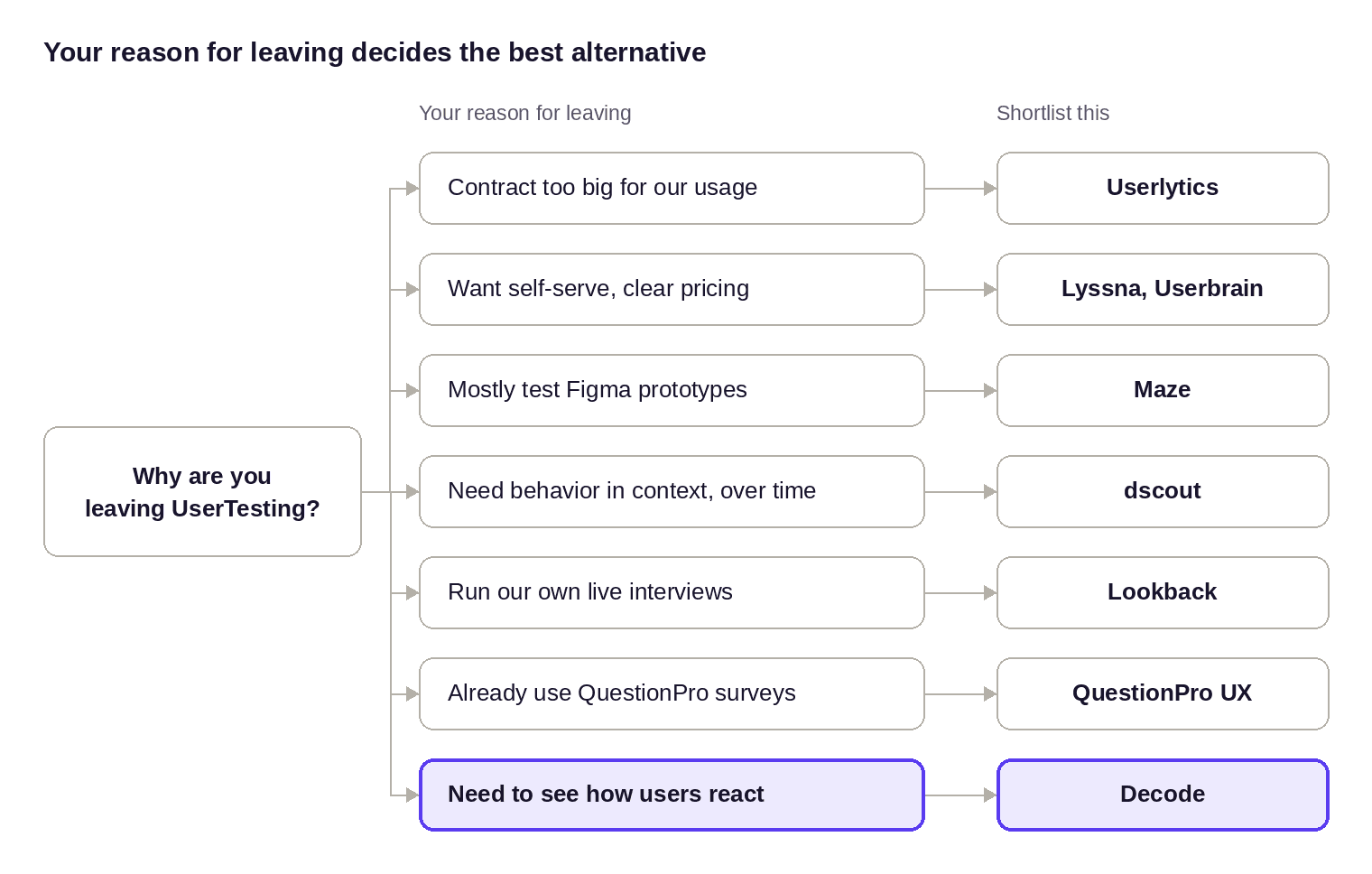
Decision guide: seven reasons for leaving UserTesting, one shortlist each
Find your reason for leaving on the left, and start your shortlist with the tool on the right. If two reasons apply, let the decision with the most riding on it choose.
Frequently asked questions
1. Is UserZoom part of UserTesting, and is it still sold separately?
Yes, UserZoom is part of UserTesting. The two merged in 2023, and userzoom.com now redirects to usertesting.com. There’s no standalone UserZoom pricing.
2. How much does UserTesting cost?
UserTesting doesn’t publish plan prices; every plan is quoted. Buyers report entry contracts of roughly $25,000 to $35,000 a year. Usage is measured in Session Units, which vary by session type, length and participant source.
3. Does UserTesting have a free plan or free trial?
UserTesting offers a free trial but no permanent free plan. Lyssna, Maze, Userbrain and Decode all have free plans.
4. Who are UserTesting’s main competitors?
For like-for-like testing, Userlytics. For self-serve testing, Lyssna and Userbrain. For prototype metrics, Maze. For diary research, dscout. For live interviews, Lookback. For usability tests that measure emotion and attention, Decode.
5. Maze vs UserTesting: which is better?
Maze is better for fast, metric-driven prototype tests. UserTesting is better for recorded think-aloud video and live sessions across many teams.
6. Is Decode a good UserTesting alternative?
Yes, especially for high-stakes flows such as onboarding, checkout and pricing. Decode runs the same usability tests and adds facial coding, eye tracking and voice emotion, so you see how users reacted at each step.
7. Can Decode run moderated and unmoderated usability tests like UserTesting?
Yes. Decode runs both, on prototypes, websites and apps, with 103M+ participants in 151 markets or your own users.
8. What is the best platform for user testing?
It depends on the decision in front of you. For broad video feedback at enterprise scale, UserTesting. For quick design checks, Lyssna or Maze. For flows where reaction matters as much as completion, Decode.
9. When UserTesting is still the right choice
UserTesting pioneered this category, and it’s still strong. It has a large contributor network, fast recruitment, an excellent video and highlight-reel workflow, moderated and unmoderated testing in one place, and enterprise security. UserTesting reports that 75 of the Fortune 100 use it.
Find the UserTesting alternative that fits your research
Leaving over cost? Look at Userlytics, Lyssna or Userbrain. Over methods? Maze for prototypes, dscout for diaries, Lookback for live interviews. Over what video can’t show you? That’s Decode.